If you have ever worked in a relational database system before, I am sure you know the concept of a schema. A schema can be described as a “container” for all of your database objects (tables,views,…etc). each database objects will be placed under the specified schema:
schema_name.table_name
So basically you can have the same exact table name but in different schemas within the PostgreSQL database.
The default schema in PostgreSQL is “PUBLIC”. when you create a table you will see that this table will automatically be created under “PUBLIC” schema.
To illustrate:
In a postgresql database called “company_sales”:
create table dummy (first_name text, last_name text);
select * from dummy;
select * from public.dummy;

To create a schema you can execute the following SQL statements in a database:
To list the databases in your PostgreSQL instance just type the command: \list
To connect to a specific database in PostgreSQL execute the command: \connect dummy

To create a schema using SQL command:
create schema emad;
If I want to create a table under a schema called emad I will do the traditional SQL statement with schema name qualifier and table name……but what if I don’t want my queries to have a schema qualifier ?
If you execute the command, the PUBLIC is the default schema for newly created objects:
SHOW search_path;

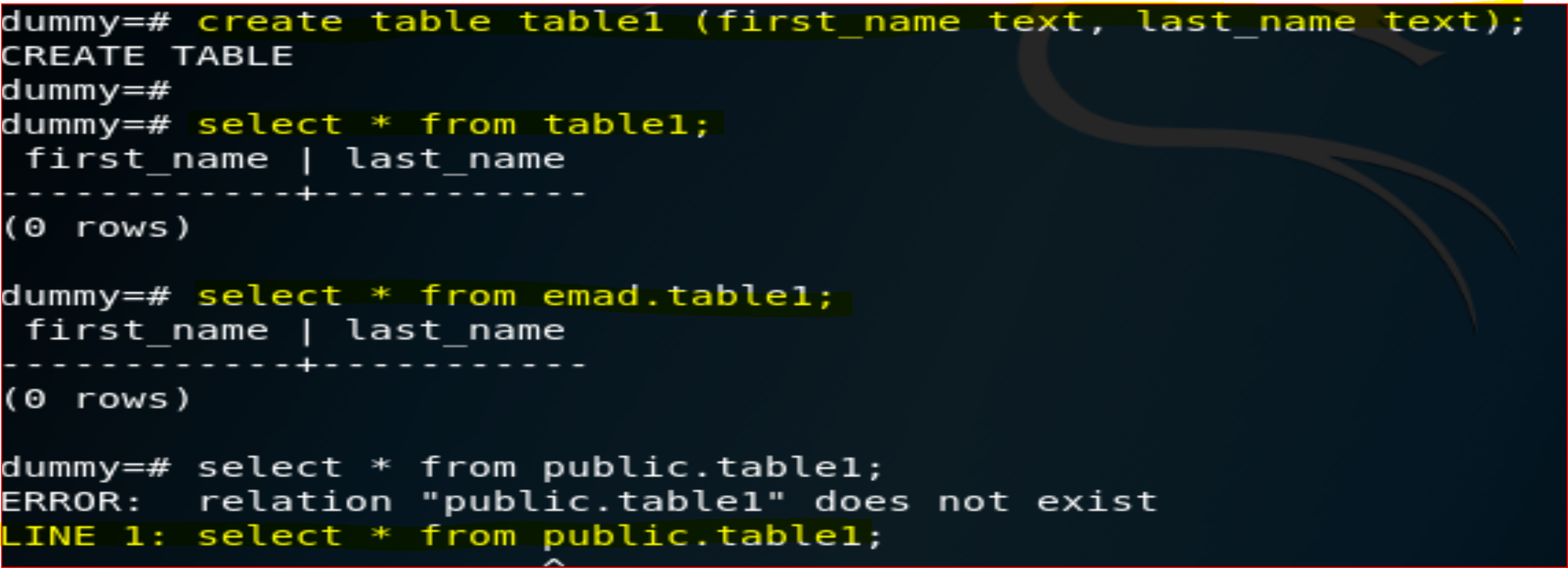
I will make schema “emad” the default schema for any newly created database objects:
SET search_path TO emad;
As shown below the table “table1” will by default be created under “emad’s” schema
Other useful schema SQL related Commands:
The following command will prevent the creation of any objects under public schema from any user:
REVOKE CREATE ON SCHEMA public FROM PUBLIC;
The following command will drop the schema with objects:
drop schema emad cascade;
 PostgreSQL Master